

How To Install 2nd Gear Kodi Build On Firestick, Android.
2nd Gear is a Great Kodi Build It can be installed through the 7o9 Wizard.2nd Gear is an extremely lightweight, quality build choice for streaming Movies and TV Shows in high definition. It uses the only One The Gears Kodi addon to provide on-demand media including 1080p & 4K definition.
2nd Gear is lightning quick and uses only one add-on that will and simple as possible
Be aware that a service Real Debrid is required to make this Build & addon work.
This Build has sections For Movies, TV Shows, Anime, Watching, Addons and Favourites.
This Build will work on Windows, Android, Mac, iOS, and Smart TV, SmartPhone, Tablet, XBOX, Android TV, Firestick & Fire TV devices.


Looking for more options for Kodi Build? See our Best Kodi Builds in list to find out more.
If you want To Install 2nd Gear Build On Kodi. Just Follow The Mentioned Steps Below.
Be sure to have the Unknown Source box checked as Kodi requires this before installing 3rd party add-ons. Here - how to Enable Unknown Sources option
Now to install an Add-on
- From your Home Screen select Settings

- Select Add Source

- Select None

-Type in the following EXACTLY https://zaxxon709.github.io/repo
- Select OK

- Go back to your Home Screen and select Add-ons

- Select the Add-on Browser Icon

- Select Install from Zip File

- Select repo

- Select repository.709-x.x.zip.
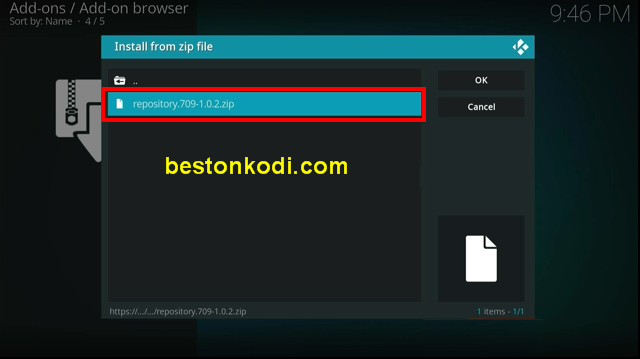
- Wait for Add-On Enabled Notification

- Select from repository

- Select The 7o9 Repo

- Select Prorgam add-ons

- Select Install

- Wait for Add-On Enabled Notification

- It will pop up a information message Select Close

- Select Yes

- Select 2nd Gear Build - > Install (Fresh install)

- Select Yes, Install.
- The build will now download and install.
- Click OK when finished and that will force close Kodi.- Open Kodi and leave for a couple of minutes so any updates can be completed. enjoy
Check out my other Kodi posts, you never know, you may find something of interest.